In my post on SEO in general, I already mentioned the three pillars of Search Engine Optimization: On-Page, Off-Page, and Technical SEO. All three are important, and we should not neglect any of them if we want to achieve good rankings in search engines.
If one of these points is neglected, it is usually the third. However, this is a mistake and can cost you valuable positions in the search results. In this article, I will therefore explain what Technical SEO is and why it is so important.
Which areas are included in Technical SEO?
As the name suggests, Technical SEO is about the technical details of a website. These are sometimes overlooked, but that should not happen. We consider the following points to be the focus of Technical SEO.
Crawling and Indexing
I explained the terms crawling and indexing in the section How do search engines work? in my general article on SEO. In short, it means that Google (or other search engines) can find, capture and evaluate the content of a website. Without these steps, a website will not appear in search results. Here are a few tips on how you can simplify this process.
Robots.txt
The robots.txt file specifies which pages may be crawled (and indexed) and which may not. It can be useful to exclude certain pages from the search engine. These include pages containing personal information or pages with duplicate content. Duplicate content can have a negative effect on rankings. However, if you have pages with very similar content, you can have one of them crawled and exclude the other to avoid problems.
Sitemaps
A sitemap is like a table of contents for a website in XML format. This table of contents can be easily read by crawlers and shows them what is available on the website and what can be crawled and indexed. Website owners should have a sitemap created and link it to Google.
Internal Links
Internal links are links from one page on your website to another page on the same website. For example, in the first sentence of this article, I linked to another article from this website. That is an internal link. Crawlers follow these links and thus become aware of other content. Internal links can make the crawler’s job easier. However, you should not overuse internal links and only use them when a reference makes sense in terms of the topic. A page where every other word is a link does not look particularly attractive.
Ad:

Responsive Webdesign / Mobile Friendliness
By responsive web design or mobile friendliness, we mean that a website should be displayed well on different screen sizes. In the past, this was more or less irrelevant when internet users only used computer screens.

However, this has changed dramatically. Today, people use smartphones, tablets, small laptop screens, larger computer screens, and sometimes tv screens to access websites. Smartphones in particular are heavily used for this purpose. According to Statista, around 96% of all people worldwide who have access to the internet own a smartphone. 62.5% of internet traffic comes from smartphones. Google responded to this in April 2015. Since then, mobile friendliness has officially been a ranking factor.
A website should be displayed well on all these screens. This applies to menus, text, images, etc. The size must always be adapted to the device or screen size.
Many web developers today work according to the “mobile first” approach. Owners of older websites had optimized them for large screens and (hopefully) had to adapt them to smartphones after they were used more and more. Mobile first means that the website is first optimized for smartphones. Adjustments for larger screens such as tablets or laptops are then made afterwards.
Loading speed
The loading speed (or page speed) of the website and individual elements (such as images) is also an important factor. A website that loads very slowly does not provide a good user experience. Many users will leave if a page takes more than a few seconds to load. Attention spans and patience have not exactly increased.
But this point is not only important because of the user experience. Search engines also pay attention to loading times. We can improve the loading speed of a website with the following tips, among others:
- Images should be compressed and the file size should not be too large.
- Videos that are embedded directly can cause long loading times. It is better to upload videos to external providers such as YouTube or Vimeo and then embed them on the page.
- Unused code should be removed. This applies in particular to JavaScript code that is no longer used. You can also remove CSS code in case you never use it.
- Browser Caching (more on this soon)
- There are many helpful WordPress plugins. However, you should not overdo it with the number of plugins. You can delete plugins that you do not need (anymore).
URL structure
The structure of the URL should be clear and direct. This means that the URL should indicate what the content of the page is about. Let’s take as an example that I want to write an article about the best way to learn French. Here are four examples of possible URL structures:
- Example 1: https://your-domain.com/how-to-learn-french
- Example 2: https://your-domain.com/learning-languages/how-to-learn-french
- Example 3: https://your-domain.com/p=123456
- Example 4: https://your-domain.com/htlf
The first two examples are good, the last two are bad. With the first two, I can tell what the article is about from the URL, even if I haven’t even read the article’s headline. With examples 3 and 4, I can only guess. These pages could be about anything.
However, the URL should not be too long. If the title or H1 heading is long, not every single word needs to appear in the URL. Individual words should be separated by a hyphen (-). The main keyword should also appear in the URL, even if this is more about on-page SEO.
SSL certificate (https://)
A look at what these abbreviations actually stand for shows why it is important to use https instead of http. HTTP is short for Hypertext Transfer Protocol, HTTPS for Hypertext Transfer Protocol Secure. HTTPS is therefore the more secure version of HTTP.
Secure here means that data is encrypted during data transmission using SSL or TLS. This is not the case with HTTP.
Many website providers already include such a certificate in their price and do not charge extra for it. The type of transmission is also a ranking factor for search engines and therefore important for SEO. If two pages have the same content and the same backlinks, the page with https:// will rank higher than the one with http://.
This can also be an important factor for users. In browsers, we can usually see whether an SSL certificate is being used. If it is missing, the website tends to make a dubious impression. This could cause you to lose users. This point is therefore a must if you want to take SEO seriously.
General structure of the website
In addition to the URL structure, the general structure of the website is also a factor in technical SEO. This means that visitors should be able to find their way around the site easily. In other words, it’s all about a good user experience.
Search engines want to suggest pages to their users where they can find information quickly and intuitively. Important factors here are a good and understandable navigation menu, helpful internal links, and the aforementioned URL structure, which we have covered in a separate section.
In general, we can say that if users find a page understandable and clear, search engines will also find it easier to understand the page and rank it well.
Redirects
This point is important if a page moves or you change the structure of the URL. Perhaps you have read the point above about the optimal URL structure and realized that your URLs are anything but optimal. Now you want to change the structure.
However, there are a few things to keep in mind. Search engines have crawled and indexed the old URLs. If users now click on a link to your website in the search results, they will see an error message. Simply changing the URL structure can have very painful consequences in terms of SEO.
In this case, you need to set up redirects. In the above case, this would be a 301 redirect. This redirects users from the old URL to the new one. Google itself has the following to say on the subject:
If you change the URL structure, you also have to look at old internal links and adpt them.
Browser Caching
As we have already seen above, the loading speed of a website is very important. A very slow site quickly loses the trust of visitors and search engines.
When a visitor visits a website for the first time, a lot of elements have to be loaded. It would be great if this did not happen every time you visit the site again or switch to another page within a website. It would be easier if repetitive elements such as an image in the header or a navigation menu were already stored in the cache. This would save loading time.
Roughly speaking, this is exactly what happens with browser caching. Various elements are cached in the browser and do not need to be requested again. For browser caching, a storage time of at least one week should be set to save loading time.
How important is technical SEO?
We can illustrate this with an example: Let’s assume that we have two websites that are exactly the same in terms of on-page SEO and off-page SEO. This means that both have the same content and the same backlinks. If website A is mobile-friendly and website B is not, website A will rank higher in search results than website B.
The same applies, for example, to https instead of http or a fast-loading page instead of a slow page. If everything else is equal, the pages with https or the faster pages will rank higher.
No ranking without technical SEO
As we have seen, providing sitemaps or a robots.txt file is part of technical SEO. This helps ensure that a page can be crawled. If a page is not crawled, it cannot be ranked. The technical details of a website are therefore the first step when it comes to good rankings.
I wouldn’t say that technical SEO is the most important of the three pillars of SEO. On-page SEO and Off-page SEO have a greater overall impact on rankings. However, technical SEO is a pillar without which no SEO strategy can work.
Optimizing the technical details won’t help you jump from 100 to 1 in Google’s rankings. But there’s a lot you can do wrong here and lose places in the rankings. Things like https and mobile friendliness are especially important these days.
Tools for technical SEO
There are several tools available for analyzing the technical SEO details of your website. These tools not only help with analysis, but also with improving your website in some cases.
Google Search Console
Google Search Console is very important for website owners. On the one hand, this tool is a good way to track whether your website is successful on Google and which keywords are generating clicks.
Search Console is also well suited for technical SEO. You can add a sitemap and link it to your site. Google Search Console also alerts you to problems with your site. These include a missing robots.txt file or unwanted redirects on the website.

Another tool is Core Web Vitals. This measures several parameters related to technical SEO. However, some user data is required to display these statistics. For small and new sites that do not (yet) have much traffic, nothing will be displayed here.
PageSpeed Insights
PageSpeed Insights provides some very important information about the technical condition of your website. You can check loading times and differences between the display on smartphones and screens. The tool also provides you with important tips on what you can improve. For example, it points out images that you could compress to save loading time.
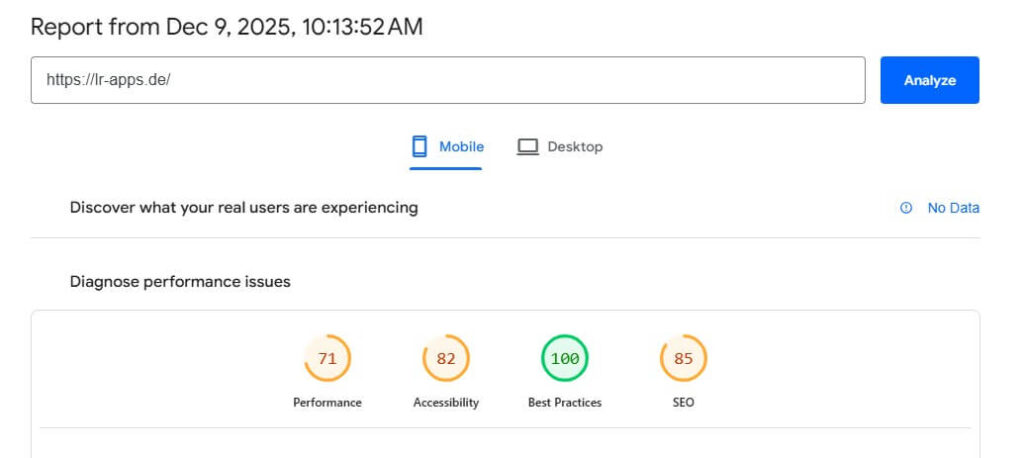
As you can see, my site performs quite well, but there is some room for improvement
WordPress plugins
- Yoast SEO: Yoast SEO is a plugin that I have installed on all of my websites. This plugin is particularly important for On-page SEO. But it can also be helpful for technical SEO. It can automatically generate a sitemap for you.
- Broken Link Checker: The Broken Link Checker does exactly what we would expect from the name. The tool checks links on your website to see if the underlying page actually exists. For example, you may have added a link to another page years ago, but now it no longer exists or the URL has changed. If an error message appears after clicking on a link, it’s not a good user experience and can look unprofessional, even if it’s not your fault.
- TinyPNG: There is also a WordPress plugin for this, which you can use to compress images. I will go into more detail about TinyPNG shortly.
- LiteSpeed Cache: LiteSpeed Cache is a great tool to improve the speed of you website.
However, I would like to reiterate that you should not install too many plugins and should delete any that are unnecessary and unused. Too many plugins can increase the loading time of the page.
TinyPNG
TinyPNG is important for compressing images and saving storage space. This can significantly reduce the loading time of the image and thus the website. Despite its name, you can not only compress images in PNG format here, but also other common formats such as .jpg or .webp.
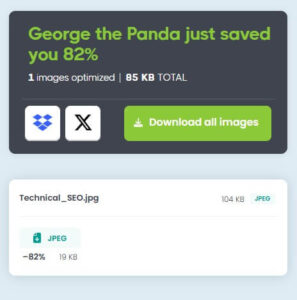
Thanks to compression, I saved 82% in file size (from 104 KB to 19 KB) for an image from this post.
You can also convert images to a different format here if, for example, you prefer more modern formats such as WebP.
Tools from TechnicalSEO.com
With this website, the domain immediately reveals what it is about (which is a sign of good SEO, as we have already seen). It also offers several tools that you can use to check your website for technical details. Among other things, there is a tool for checking mobile friendliness.
Conclusion on technical SEO
If you are a fan of team sports, you may be familiar with a version of the following saying: A team cannot win a championship in a single game during the season, but it can lose it. This means that on a normal day, you may not necessarily receive applause, but you can lose a lot.
It is similar with technical SEO. It is the basis for a good ranking in search engines. Some technical SEO measures will not even be noticed by visitors, partly because they are taken for granted. As a result, they are often underestimated. However, a website owner can lose a lot if these measures are not taken into account. If you write excellent texts but your website is very confusing and not mobile-friendly, you will lose a lot of traffic and places in the Google ranking.
0 Comments